# Terms & Conditions

## **ConvertixCheckout for Hyvä Theme**

<p class="callout warning"><span style="white-space: pre-wrap;">This module is compatible only with </span>[**Hyvä Theme**](https://hyva.io/). Luma-based storefronts are not supported.</p>

[![image.png](https://docs.tmgcode.ro/uploads/images/gallery/2026-05/scaled-1680-/O30image.png)](https://docs.tmgcode.ro/uploads/images/gallery/2026-05/O30image.png)

#### <span style="white-space: pre-wrap;">1. </span><span style="color: rgb(48, 48, 48); background-color: rgb(255, 255, 255);">Enable Terms &amp; Conditions Checkbox</span>

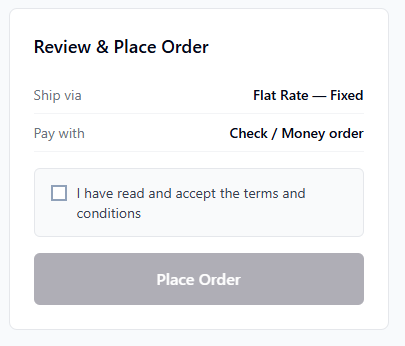
<span style="color: rgb(48, 48, 48); background-color: rgb(255, 255, 255);">When enabled, customer must accept T&amp;C before placing the order.</span>

#### <span style="white-space: pre-wrap;">2. </span><span style="color: rgb(48, 48, 48); background-color: rgb(255, 255, 255);">Checkbox Label</span>

<span style="color: rgb(48, 48, 48); background-color: rgb(255, 255, 255);">You can set any Terms &amp; Conditions text next to checkbox.</span>

[![image.png](https://docs.tmgcode.ro/uploads/images/gallery/2026-05/scaled-1680-/6acimage.png)](https://docs.tmgcode.ro/uploads/images/gallery/2026-05/6acimage.png)

#### <span style="white-space: pre-wrap;">3. </span><span style="color: rgb(48, 48, 48); background-color: rgb(255, 255, 255);">Terms Page URL</span>

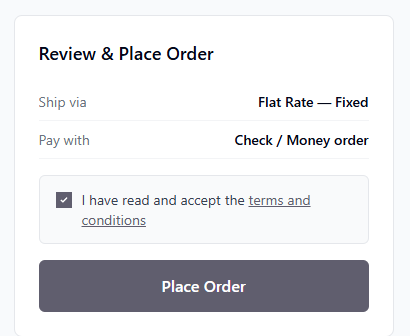
<span style="color: rgb(48, 48, 48); background-color: rgb(255, 255, 255);">Set Terms &amp; Conditions magento url or use external url instead.</span>

**Example:**

```
/privacy-policy-cookie-restriction-mode
```

**Or external link:**

```
https://your-external.link/terms-and-conditions.html
```

[![image.png](https://docs.tmgcode.ro/uploads/images/gallery/2026-05/scaled-1680-/WMTimage.png)](https://docs.tmgcode.ro/uploads/images/gallery/2026-05/WMTimage.png)