# Configuration

# General configuration

## **ConvertixCheckout for Hyvä Theme**

<p class="callout warning"><span style="white-space: pre-wrap;">This module is compatible only with </span>[**Hyvä Theme**](https://hyva.io/). Luma-based storefronts are not supported.</p>

![image.png](https://docs.tmgcode.ro/uploads/images/gallery/2026-05/scaled-1680-/sELimage.png)#### <span style="color: rgb(48, 48, 48); background-color: rgb(255, 255, 255);">1. Enable Custom Checkout</span>

<span style="color: rgb(48, 48, 48); background-color: rgb(255, 255, 255); white-space: pre-wrap;">When disabled, the Hyvä fallback message will be shown instead. </span>

#### <span style="color: rgb(48, 48, 48); background-color: rgb(255, 255, 255);">1. Checkout Layout</span>

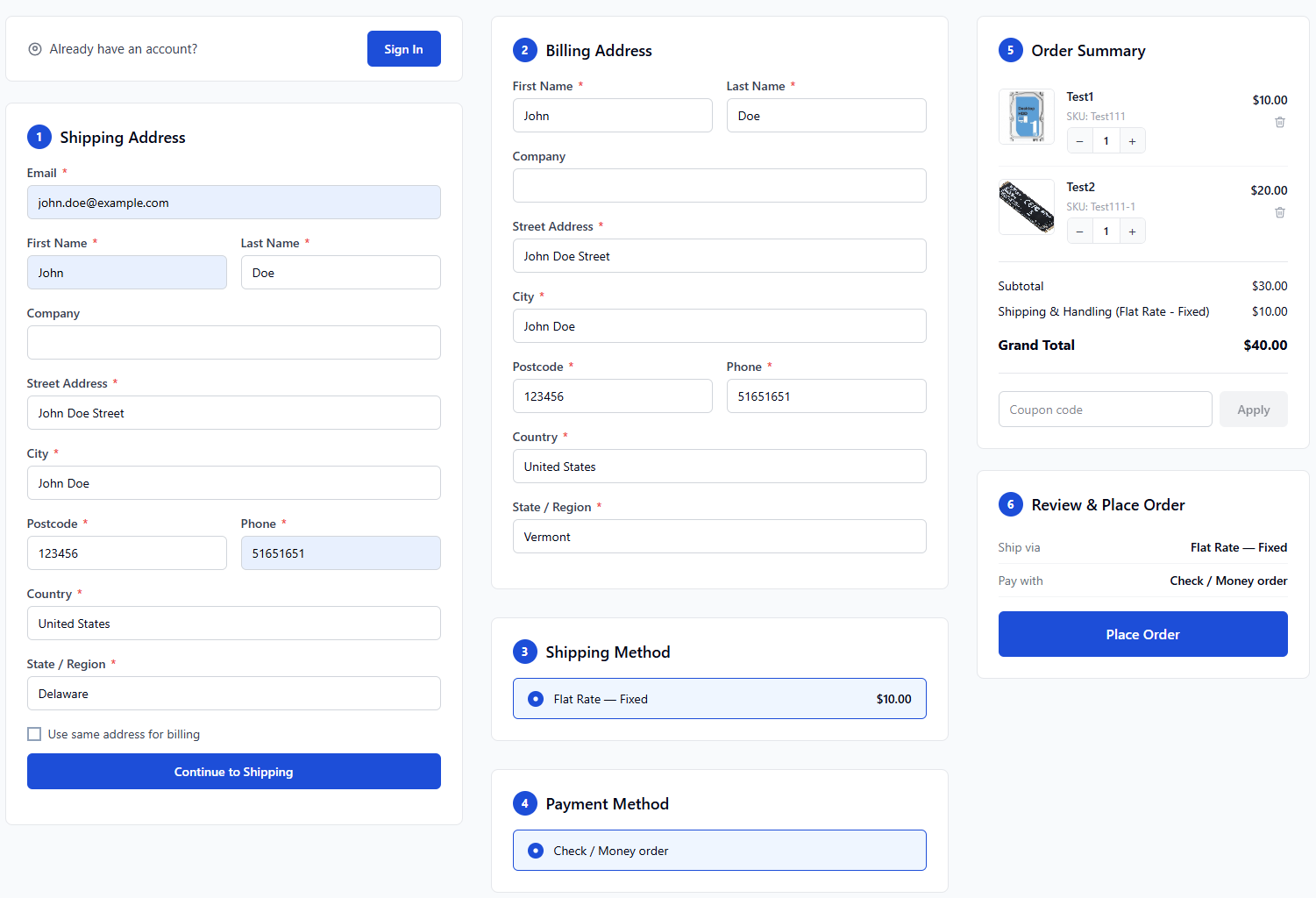
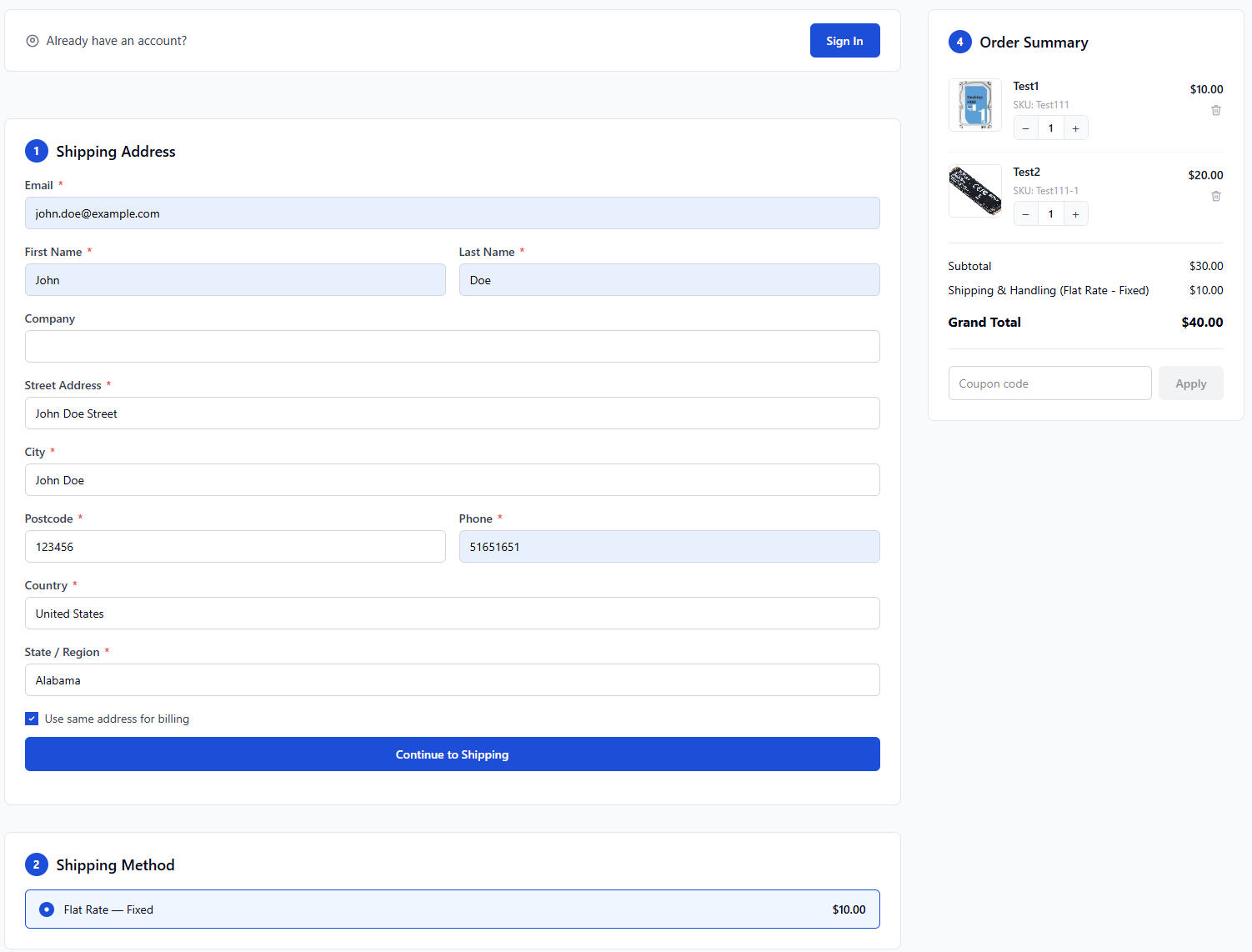
<span style="color: rgb(48, 48, 48); background-color: rgb(255, 255, 255);">2 Columns: shipping steps left + order summary right. 3 Columns (onepage): address | shipping+payment | summary.</span>

<table id="bkmrk-3-columns-%28onepage%292"><colgroup><col style="width: 500px;"></col><col style="width: 500px;"></col></colgroup><tbody><tr><td>**3 Columns (onepage)**

</td><td>**2 Columns**

</td></tr><tr style="height: 10px;"><td>[![image.png](https://docs.tmgcode.ro/uploads/images/gallery/2026-05/scaled-1680-/HHJimage.png)](https://docs.tmgcode.ro/uploads/images/gallery/2026-05/HHJimage.png)

</td><td>[![image.png](https://docs.tmgcode.ro/uploads/images/gallery/2026-05/scaled-1680-/E5aimage.png)](https://docs.tmgcode.ro/uploads/images/gallery/2026-05/E5aimage.png)

</td></tr></tbody></table>

# Checkout Options

## **ConvertixCheckout for Hyvä Theme**

<p class="callout warning"><span style="white-space: pre-wrap;">This module is compatible only with </span>[**Hyvä Theme**](https://hyva.io/). Luma-based storefronts are not supported.</p>

![image.png](https://docs.tmgcode.ro/uploads/images/gallery/2026-05/scaled-1680-/xXMimage.png)#### <span style="color: rgb(48, 48, 48); background-color: rgb(255, 255, 255);">1. Enable Coupon Code</span>

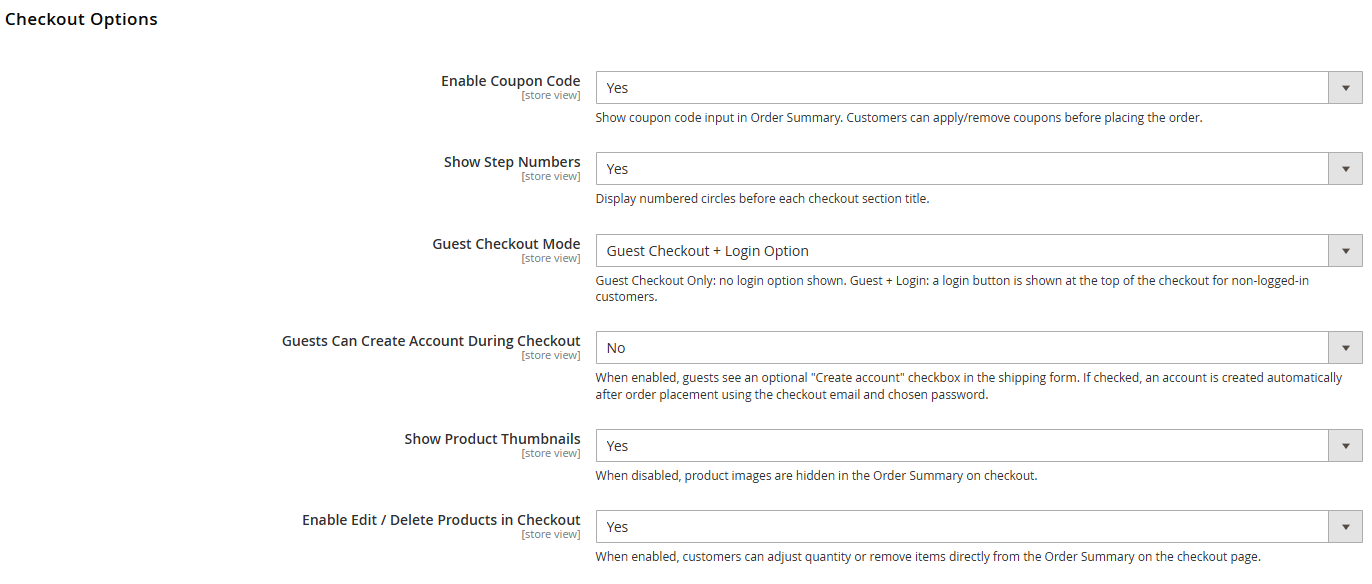
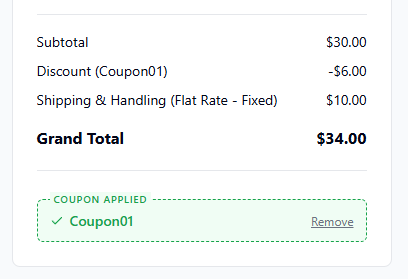
<span style="color: rgb(48, 48, 48); background-color: rgb(255, 255, 255);">Show coupon code input in Order Summary. Customers can apply/remove coupons before placing the order.</span>

[![image.png](https://docs.tmgcode.ro/uploads/images/gallery/2026-05/scaled-1680-/9Xeimage.png)](https://docs.tmgcode.ro/uploads/images/gallery/2026-05/9Xeimage.png)

#### <span style="color: rgb(48, 48, 48); background-color: rgb(255, 255, 255);">2. Show Step Numbers</span>

<span style="color: rgb(48, 48, 48); background-color: rgb(255, 255, 255);">Display numbered circles before each checkout section title.</span>

<table id="bkmrk-yesno"><colgroup><col style="width: 500px;"></col><col style="width: 500px;"></col></colgroup><tbody><tr><td>**YES**

</td><td>**NO**

</td></tr><tr><td>[![image.png](https://docs.tmgcode.ro/uploads/images/gallery/2026-05/scaled-1680-/eMAimage.png)](https://docs.tmgcode.ro/uploads/images/gallery/2026-05/eMAimage.png)

</td><td>[![image.png](https://docs.tmgcode.ro/uploads/images/gallery/2026-05/scaled-1680-/Zggimage.png)](https://docs.tmgcode.ro/uploads/images/gallery/2026-05/Zggimage.png)

</td></tr></tbody></table>

#### <span style="color: rgb(48, 48, 48); background-color: rgb(255, 255, 255);">3. Guest Checkout Mode</span>

<span style="color: rgb(48, 48, 48); background-color: rgb(255, 255, 255);">Guest Checkout Only: no login option shown. Guest + Login: a login button is shown at the top of the checkout for non-logged-in customers.</span>

#### <span style="color: rgb(48, 48, 48); background-color: rgb(255, 255, 255);">4. Guests Can Create Account During Checkout</span>

<span style="color: rgb(48, 48, 48); background-color: rgb(255, 255, 255);">When enabled, guests see an optional "Create account" checkbox in the shipping form. If checked, an account is created automatically after order placement using the checkout email and chosen password.</span>

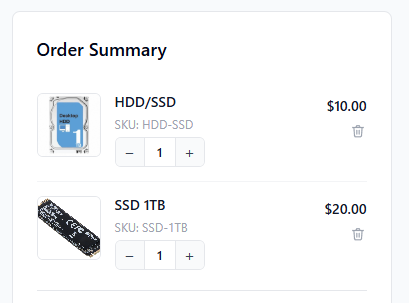
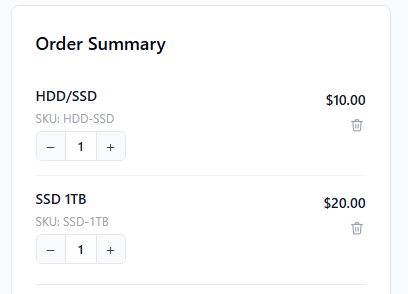
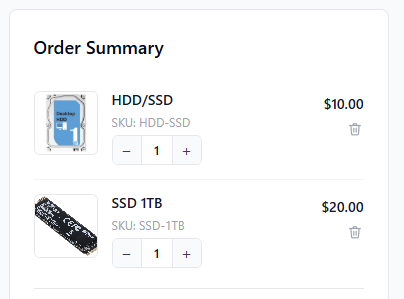
#### <span style="color: rgb(48, 48, 48); background-color: rgb(255, 255, 255);">5. Show Product Thumbnails</span>

<span style="color: rgb(48, 48, 48); background-color: rgb(255, 255, 255);">When disabled, product images are hidden in the Order Summary on checkout.</span>

<table id="bkmrk-yesno-1"><colgroup><col style="width: 240px;"></col><col style="width: 240px;"></col></colgroup><tbody><tr><td>**YES**

</td><td>**NO**

</td></tr><tr><td>[![image.png](https://docs.tmgcode.ro/uploads/images/gallery/2026-05/scaled-1680-/cD9image.png)](https://docs.tmgcode.ro/uploads/images/gallery/2026-05/cD9image.png)

</td><td>[![image.png](https://docs.tmgcode.ro/uploads/images/gallery/2026-05/scaled-1680-/GiVimage.png)](https://docs.tmgcode.ro/uploads/images/gallery/2026-05/GiVimage.png)

</td></tr></tbody></table>

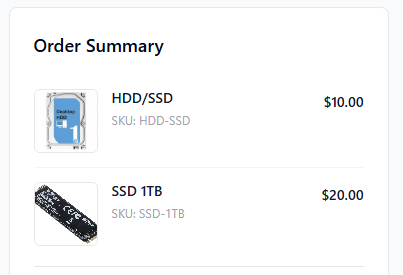
#### <span style="color: rgb(48, 48, 48); background-color: rgb(255, 255, 255);">6. Enable Edit / Delete Products in Checkout</span>

<table id="bkmrk-yesno-2"><colgroup><col style="width: 240px;"></col><col style="width: 240px;"></col></colgroup><tbody><tr><td>**YES**

</td><td>**NO**

</td></tr><tr><td>[![image.png](https://docs.tmgcode.ro/uploads/images/gallery/2026-05/scaled-1680-/s7wimage.png)](https://docs.tmgcode.ro/uploads/images/gallery/2026-05/s7wimage.png)

</td><td>[![image.png](https://docs.tmgcode.ro/uploads/images/gallery/2026-05/scaled-1680-/zTBimage.png)](https://docs.tmgcode.ro/uploads/images/gallery/2026-05/zTBimage.png)

</td></tr></tbody></table>

# Appearance

## **ConvertixCheckout for Hyvä Theme**

<p class="callout warning"><span style="white-space: pre-wrap;">This module is compatible only with </span>[**Hyvä Theme**](https://hyva.io/). Luma-based storefronts are not supported.</p>

[![image.png](https://docs.tmgcode.ro/uploads/images/gallery/2026-05/scaled-1680-/4dZimage.png)](https://docs.tmgcode.ro/uploads/images/gallery/2026-05/4dZimage.png)

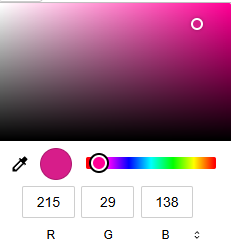
#### <span style="color: rgb(48, 48, 48); background-color: rgb(255, 255, 255);">1. Primary Color</span>

<span style="color: rgb(48, 48, 48); background-color: rgb(255, 255, 255);">Used for buttons, step number circles, spinner and selected method highlights. Enter a hex value (e.g. #1d4ed8).</span>

**Unlimited color configuration using color picker.**

[![image.png](https://docs.tmgcode.ro/uploads/images/gallery/2026-05/scaled-1680-/ReUimage.png)](https://docs.tmgcode.ro/uploads/images/gallery/2026-05/ReUimage.png)
#### <span style="color: rgb(48, 48, 48); background-color: rgb(255, 255, 255);">2. Primary Button Text Color</span>

<span style="color: rgb(48, 48, 48); background-color: rgb(255, 255, 255);">Text color on primary buttons. Default: #ffffff.</span>

[![image.png](https://docs.tmgcode.ro/uploads/images/gallery/2026-05/scaled-1680-/SwKimage.png)](https://docs.tmgcode.ro/uploads/images/gallery/2026-05/SwKimage.png)

# Terms & Conditions

## **ConvertixCheckout for Hyvä Theme**

<p class="callout warning"><span style="white-space: pre-wrap;">This module is compatible only with </span>[**Hyvä Theme**](https://hyva.io/). Luma-based storefronts are not supported.</p>

[![image.png](https://docs.tmgcode.ro/uploads/images/gallery/2026-05/scaled-1680-/O30image.png)](https://docs.tmgcode.ro/uploads/images/gallery/2026-05/O30image.png)

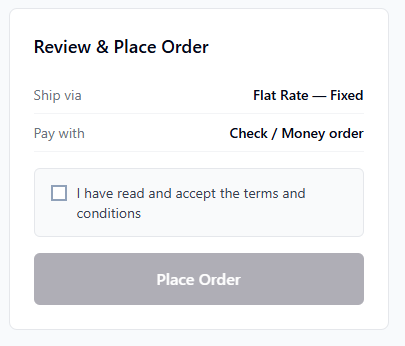
#### <span style="white-space: pre-wrap;">1. </span><span style="color: rgb(48, 48, 48); background-color: rgb(255, 255, 255);">Enable Terms &amp; Conditions Checkbox</span>

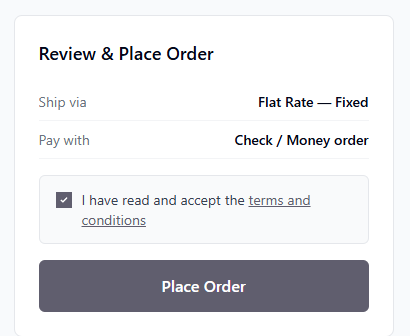
<span style="color: rgb(48, 48, 48); background-color: rgb(255, 255, 255);">When enabled, customer must accept T&amp;C before placing the order.</span>

#### <span style="white-space: pre-wrap;">2. </span><span style="color: rgb(48, 48, 48); background-color: rgb(255, 255, 255);">Checkbox Label</span>

<span style="color: rgb(48, 48, 48); background-color: rgb(255, 255, 255);">You can set any Terms &amp; Conditions text next to checkbox.</span>

[![image.png](https://docs.tmgcode.ro/uploads/images/gallery/2026-05/scaled-1680-/6acimage.png)](https://docs.tmgcode.ro/uploads/images/gallery/2026-05/6acimage.png)

#### <span style="white-space: pre-wrap;">3. </span><span style="color: rgb(48, 48, 48); background-color: rgb(255, 255, 255);">Terms Page URL</span>

<span style="color: rgb(48, 48, 48); background-color: rgb(255, 255, 255);">Set Terms &amp; Conditions magento url or use external url instead.</span>

**Example:**

```
/privacy-policy-cookie-restriction-mode
```

**Or external link:**

```
https://your-external.link/terms-and-conditions.html
```

[![image.png](https://docs.tmgcode.ro/uploads/images/gallery/2026-05/scaled-1680-/WMTimage.png)](https://docs.tmgcode.ro/uploads/images/gallery/2026-05/WMTimage.png)
# Success / Thank You Page

## **ConvertixCheckout for Hyvä Theme**

<p class="callout warning"><span style="white-space: pre-wrap;">This module is compatible only with </span>[**Hyvä Theme**](https://hyva.io/). Luma-based storefronts are not supported.</p>

[![image.png](https://docs.tmgcode.ro/uploads/images/gallery/2026-05/scaled-1680-/JAHimage.png)](https://docs.tmgcode.ro/uploads/images/gallery/2026-05/JAHimage.png)

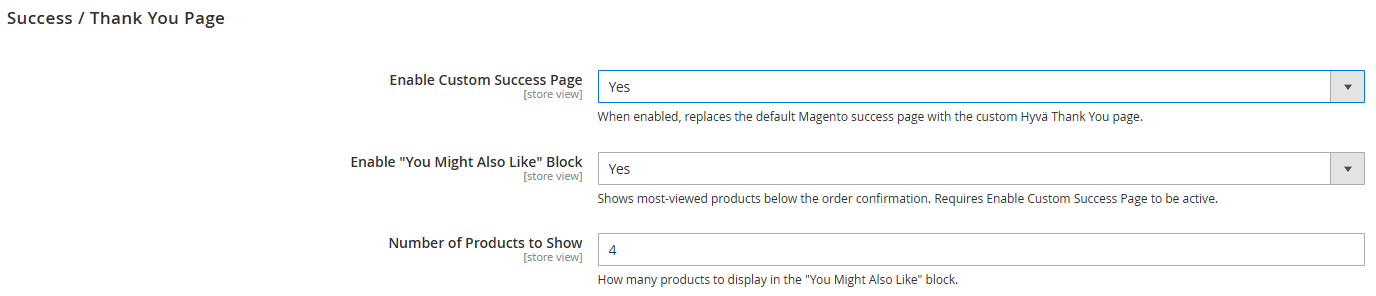
#### <span style="white-space: pre-wrap;">1. </span><span style="color: rgb(48, 48, 48); background-color: rgb(255, 255, 255);">Enable Custom Success Page</span>

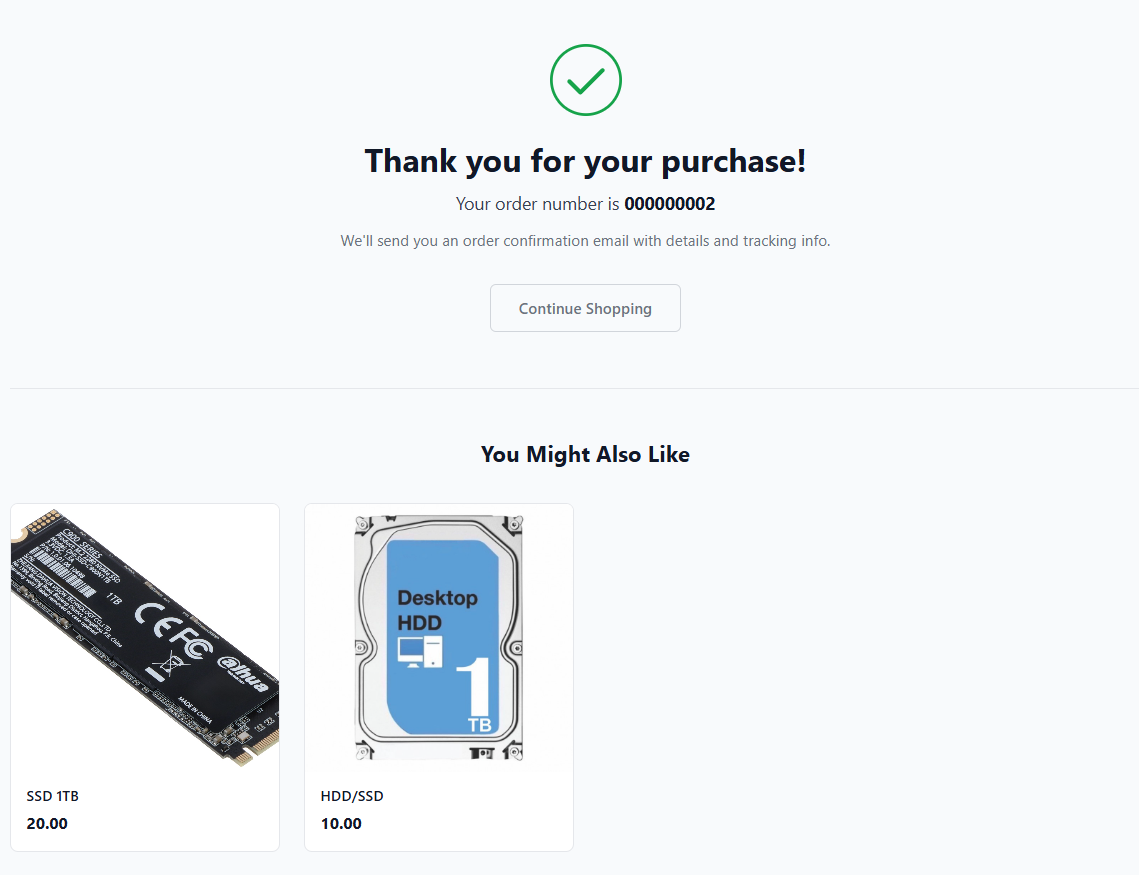
<span style="color: rgb(48, 48, 48); background-color: rgb(255, 255, 255);">When enabled, replaces the default Magento success page with the custom Hyvä Thank You page.</span>

[![image.png](https://docs.tmgcode.ro/uploads/images/gallery/2026-05/scaled-1680-/BqXimage.png)](https://docs.tmgcode.ro/uploads/images/gallery/2026-05/BqXimage.png)

#### <span style="white-space: pre-wrap;">2. </span><span style="color: rgb(48, 48, 48); background-color: rgb(255, 255, 255);">Enable "You Might Also Like" Block</span>

<span style="color: rgb(48, 48, 48); background-color: rgb(255, 255, 255);">Shows most-viewed products below the order confirmation. Requires Enable Custom Success Page to be active.</span>

#### <span style="white-space: pre-wrap;">3. </span><span style="color: rgb(48, 48, 48); background-color: rgb(255, 255, 255);">Number of Products to Show</span>

<span style="color: rgb(48, 48, 48); background-color: rgb(255, 255, 255);">How many products to display in the "You Might Also Like" block.</span>